This article has been revised and updated from its original version published in 2022 to reflect the latest Apache Iceberg developments, including V3 partition transforms and multi-engine ecosystem improvements.
One of the most common performance killers in traditional data lakes is the accidental full table scan. A user writes WHERE order_date = '2024-03-15' but the table is partitioned by year and month columns, since the query didn't filter on those exact partition columns, the engine scans every file. Apache Iceberg eliminates this entire category of problems with hidden partitioning.
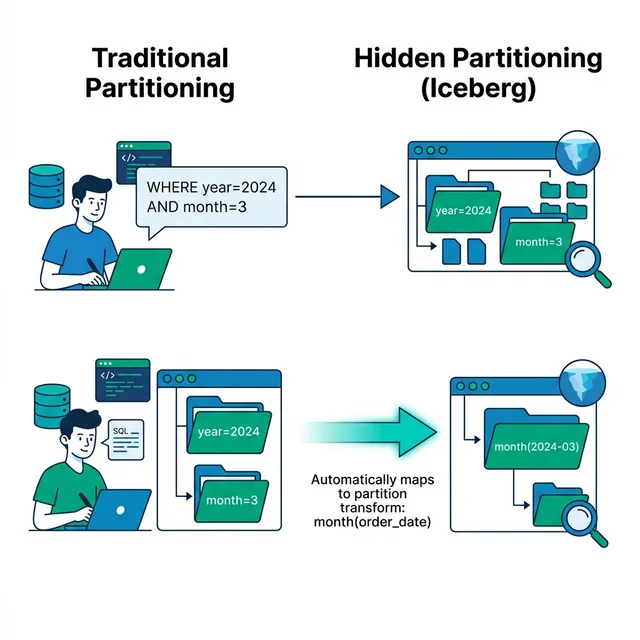
Hidden partitioning is one of Iceberg's most impactful features for real-world query performance. It means users never need to know how a table is partitioned. They write natural predicates, and Iceberg maps them to the correct partitions automatically.
The Problem with Traditional Partitioning
In Hive-style partitioning, partitions are physical directories on storage: For official documentation, refer to the Iceberg partitioning spec.
To use these partitions, users must write queries that filter on the exact partition columns:
-- Works: Filter matches partition columns
SELECT * FROM orders WHERE year = 2024 AND month = 3;

-- BROKEN: Full table scan! order_date is not a partition column
SELECT * FROM orders WHERE order_date = '2024-03-15';
This creates several problems:
Try Dremio’s Interactive Demo
Explore this interactive demo and see how Dremio's Intelligent Lakehouse enables Agentic AI
Users Must Know the Partition Scheme
Every analyst, data scientist, and BI tool must be aware of how the table is physically organized. This is a leaky abstraction, implementation details bleeding into the query layer.
Partition Columns Pollute the Schema
The year and month columns are synthetic, they exist only for partitioning. They shouldn't be part of the logical table definition, but in Hive, they are.
Changing the Partition Scheme Is Destructive
If you want to change from monthly to daily partitions, you must rewrite the entire table. There's no way to evolve the partition scheme without a full data migration.
Wrong Queries Cause Silent Performance Disasters
There's no warning when a query doesn't use partition columns. It just scans everything and runs 100x slower than expected. On a petabyte table, this can cost thousands of dollars in compute.
How Iceberg Hidden Partitioning Works
Iceberg separates the logical partition definition from query predicates. You define partition transforms on source columns, and Iceberg handles the mapping.
Defining Partitions
CREATE TABLE orders (
    order_id BIGINT,
    customer_id BIGINT,
    order_date TIMESTAMP,
    amount DECIMAL(10,2),
    region STRING
)
PARTITIONED BY (month(order_date), region);
Notice: there are no synthetic year or month columns. The partition is defined as a transform function month() applied to the existing order_date column.
How Queries Map to Partitions
When a user writes:
SELECT * FROM orders WHERE order_date = '2024-03-15';
Iceberg's planning step:
Reads the partition spec: month(order_date)
Evaluates: month('2024-03-15') = 2024-03
Uses the manifest list to skip all partitions except 2024-03
The user wrote a natural predicate on order_date. Iceberg automatically mapped it to the correct partition. No partition column awareness required.
Available Partition Transforms
Transform
Input Type
Example
Use Case
identity(col)
Any
identity(region)
Low cardinality columns
year(col)
Timestamp/Date
year(order_date)
Annual reporting
month(col)
Timestamp/Date
month(order_date)
Monthly batch workloads
day(col)
Timestamp/Date
day(order_date)
Daily ingestion
hour(col)
Timestamp
hour(event_ts)
High-volume streaming
bucket(N, col)
Any
bucket(16, user_id)
Even distribution for joins
truncate(W, col)
String/Int
truncate(3, zip_code)
Grouping by prefix
Range Predicate Support
Hidden partitioning works with range predicates too:
-- Scans only partitions for March, April, May 2024
SELECT * FROM orders WHERE order_date BETWEEN '2024-03-01' AND '2024-05-31';
Iceberg evaluates the range against partition bounds and prunes partitions that fall entirely outside the range.
Manifest list level: Each manifest entry includes partition summaries. Iceberg skips manifests whose partition ranges don't overlap with the query predicate.
Manifest file level: Within surviving manifests, each data file entry includes the partition value. Files with non-matching partitions are skipped.
Data file level: Column statistics within each surviving file enable further pruning.
One of the most powerful consequences of hidden partitioning is partition evolution. Since partitions are defined as transforms (not physical directory schemes), you can change the partition scheme without rewriting data:
-- Table was partitioned by month; traffic grew, now need daily partitions
ALTER TABLE orders SET PARTITION SPEC (day(order_date), region);
After this change:
Old data stays in monthly partitions, no rewrite needed
New data is written to daily partitions
Queries spanning both time periods work correctly, Iceberg evaluates the predicate against both partition specs
This is impossible with Hive-style partitioning, where changing the partition scheme requires rewriting every file.
Multi-Column Partitioning and Query Planning
Tables can be partitioned by multiple transforms:
PARTITIONED BY (day(order_date), bucket(8, customer_id));
When a query filters on order_date, Iceberg prunes by date partitions but scans all customer buckets. When a query filters on both order_date AND customer_id, both partition dimensions are used for pruning.
For multi-column filter patterns that don't map to partitions, consider Z-ordering to improve within-file pruning.
Begin with month(ts) partitioning. If data volume grows and queries become more granular, evolve to day(ts). You can always add granularity without rewriting.
Avoid Over-Partitioning
Too many partitions create too many small files. A partition should contain at least one full-size data file (128-256MB). If each partition has only a few megabytes, consolidate.
Combine with Sort Order
Within each partition, sort data by frequently filtered columns. This tightens column statistics and improves file pruning.
Use Bucket for High-Cardinality Joins
bucket(N, join_key) evenly distributes data for parallel join execution across engines. Good for customer_id, user_id, or other high-cardinality columns.
use Dremio Reflections
Dremio's Reflections work with hidden partitions, you can create Reflections with different sort orders and partition schemes optimized for specific query patterns.
-- Works perfectly, Iceberg maps to day partition automatically
SELECT * FROM events
WHERE event_ts > TIMESTAMP '2024-03-01 00:00:00'
  AND user_id = 42;
Evolve the Partition Scheme
ALTER TABLE events SET PARTITION SPEC (hour(event_ts), bucket(32, user_id));
Hidden partitioning is one of the key advantages that makes Iceberg the most performant open table format for production workloads. It eliminates a class of performance bugs that plague traditional data lakes and enables non-technical users to write fast queries without understanding data layout.
Real-World Scenarios
Scenario 1: E-Commerce Order Analytics
An e-commerce company has an orders table with 500 million rows across 3 years. Analysts query by date range, region, and product category.
Without hidden partitioning (Hive):
-- Analyst must know: table is partitioned by year and month columns
SELECT region, SUM(total) FROM orders
WHERE year = 2024 AND month = 3 AND region = 'US';
-- If analyst writes WHERE order_date = '2024-03-15', full table scan!
With hidden partitioning (Iceberg):
-- Analyst writes natural queries, Iceberg handles partition mapping
SELECT region, SUM(total) FROM orders
WHERE order_date BETWEEN '2024-03-01' AND '2024-03-31' AND region = 'US';
-- Automatically maps to month=2024-03 partition, scans only matching files
The Iceberg version is safer (no accidental full scans), more readable (natural predicates), and forward-compatible (partition scheme can evolve without changing queries).
Scenario 2: IoT Sensor Data with Time-Based Access
An IoT platform ingests sensor readings partitioned by hour(event_ts). Data scientists query by specific time windows, while dashboards query by day or week.
-- Data scientist: query specific 2-hour window
SELECT * FROM sensor_data
WHERE event_ts BETWEEN TIMESTAMP '2024-03-15 14:00:00' AND TIMESTAMP '2024-03-15 16:00:00';
-- Iceberg prunes to exactly 2 hour-partitions

-- Dashboard: daily rollup
SELECT sensor_id, AVG(reading) FROM sensor_data
WHERE event_ts >= TIMESTAMP '2024-03-15 00:00:00'
  AND event_ts < TIMESTAMP '2024-03-16 00:00:00'
GROUP BY sensor_id;
-- Iceberg prunes to 24 hour-partitions
Both queries work correctly and efficiently without either user knowing the partition scheme.
Scenario 3: Multi-Tenant SaaS with Bucket Partitioning
A SaaS application uses bucket(32, tenant_id) partitioning to evenly distribute data across partitions for parallel processing. Queries always filter by tenant:
SELECT * FROM events WHERE tenant_id = 'acme-corp' AND event_type = 'login';
-- Iceberg evaluates bucket(32, 'acme-corp') = bucket 17
-- Scans only 1 of 32 buckets, 97% of data pruned
Frequently Asked Questions
Does hidden partitioning work with every query engine?
Yes, the partition spec is stored in the table metadata, and every engine that reads Iceberg tables evaluates it during query planning. The pruning happens at the metadata level, not in engine-specific code.
Can I use hidden partitioning with existing data?
Yes. You can add a partition spec to an existing table, and new writes will follow the new partition scheme. Existing data stays unpartitioned, but future writes are partitioned. Over time, as old data is compacted or replaced, the entire table becomes partitioned. See partition evolution for details.
How does hidden partitioning affect write performance?
There's minimal overhead. The engine evaluates the partition transform for each row during writes to route it to the correct partition. For transforms like month() or day(), this is a simple timestamp extraction, negligible compared to the cost of serializing and uploading Parquet files.
Does Dremio support all partition transforms?
Yes. Dremio supports all standard Iceberg partition transforms including identity, year, month, day, hour, bucket, and truncate. Dremio's Reflections can also add additional sort orders and partition schemes optimized for specific dashboard query patterns.
What about cost savings?
By pruning 80-95% of files before scanning, hidden partitioning directly reduces object storage read costs. On AWS, each S3 GET request costs $0.0004 per 1,000 requests. A query that scans 10,000 files instead of 500 costs 20x more in S3 API fees alone, not counting the compute time difference.
When it comes to running queries on your data lake, Hive delivers some great conveniences in being able to write SQL queries that can be converted into MapReduce jobs on HDFS (Hadoop Distributed File System). Hive provides users the ability to interact with tables by putting files in a particular directory – but this means when you query that table it will scan through every record (referred to as a full table scan), which makes queries take a long time to plan and to execute, especially at scale. To address this problem, Hive went with the tried-and-true method of partitioning, which enables you to specify a column or columns to split the dataset into smaller pieces.
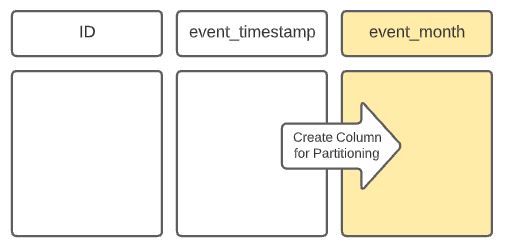
For example, if the queries on a dataset commonly filter by month, you may want to partition the data by month. However, in most events and datasets, there isn’t an “event_month” field – rather, it’s usually event_date or event_timestamp. So, in order to partition by month, the ETL job writing the data to this table would have to duplicate the data in the event_timestamp field, truncate it to the month granularity, and write it to a new column “event_month.” This creates a directory in the table directory for each month, and queries that filter by this derived “event_month” field would take advantage of partition pruning and avoid a full table scan, resulting in much better response times.
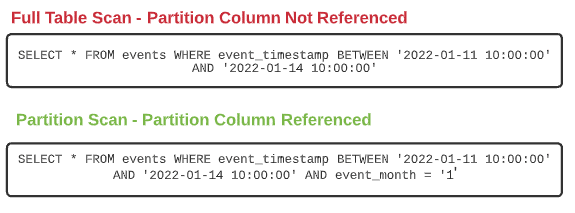
However, many users of the dataset, especially new users, may not know about this duplicative field. They’re typically used to filtering by when the event really happened – the event_timestamp. If a user’s query filters for a single month, but not on the new event_month field (e.g., event_timestamp BETWEEN ‘2022-01-01’ AND ‘2022-01-31’), the query will not do any partition pruning, resulting in a full table scan and painfully slow response times.
By relying on the physical file system structure to determine what is a table and a partition, Hive tables had several disadvantages:
The wrong partition scheme could result in many subdirectories and files which could make query planning and execution take longer as they iterate through directories and files, aka the infamous small file problem.
If you wanted to re-partition, it would involve a complete rewrite of the data because the data would have to be reorganized along with the directory structure which would be very costly.
Partition columns must be used explicitly to avoid a full table scan. For some partition schemes, you need to create a new column (for example, taking a timestamp and making a year, month or date column). To benefit from the partition you always have to include the new month column in your query even if you specified a “where” clause on the original timestamp column.
There’s a need for a better way of tracking tables and partitions whether using Hive with HDFS, Cloud Object Storage, or any other storage layer.
Smarter Partitioning with Apache Iceberg
There have been several attempts to create a “table format” that can track tables in a way that eliminates many of these pain points. Each has different limitations, such as what file types you can work with, what types of transactions are possible, and more. At Netflix, a solution was created that is now an Apache Foundation Project called Apache Iceberg.
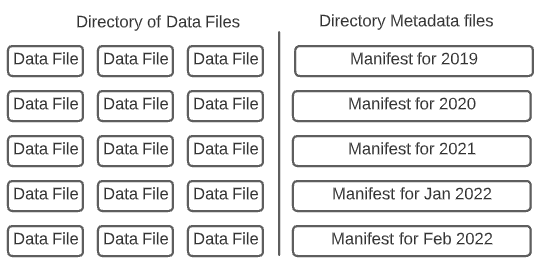
The Apache Iceberg table format separates the definition of tables and partitions from the physical structure of the files through three layers of metadata that track the overall table, its snapshots, and the list of data files, respectively. This brings many benefits:
Since partitions are tracked within metadata files, you don’t have to worry about partition subdirectories slowing down your queries based on your partitioning.
You can evolve your partitions. For example, if you were partitioning data by year and wanted to partition by month going forward you can do so without rewriting the table. The old data will follow the old partition, new data will follow the new partition, and Iceberg will be made aware in order to plan queries appropriately. Evolving your partitions can be a lot less expensive than a complete repartitioning rewrite.
In particular, an Iceberg feature called “hidden partitioning” helps overcome many of the challenges associated with partitioning Hive tables.
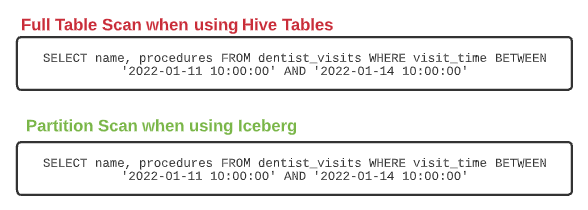
Let’s say you have a table of dentist visits with a timestamp of when the visit occurred as a column. Hive would need the timestamp column transformed into a new column to partition the data by month. In the query below, the data is taken from one non-partitioned table and created in a new partitioned table.
The problem arises when you want to query a particular set of days within a month (example below). Even though the where clause already captures the time window based on the same visit_time column that visit_month is based on, you still have to explicitly query the month column to get the benefit of the partition (without it a full table scan would occur). This could result in someone who is not familiar with the partitioning of the table running longer, more expensive queries than they need to.
The experience is significantly improved with the Iceberg format. Instead of creating a new field to be the partition column, you can specify a column and transform it. Both are tracked within the metadata without having to add a physical column to the table.
So when it comes to writing the files and organizing the data files and the metadata around them, such as manifests, Iceberg knows the table is partitioned by the column visit_time and the transform month. So when anyone queries the visit_time column there is no need to specify a different, partition-specific column in the query. That step is taken care of by Iceberg.
u003ca href=u0022https://iceberg.apache.org/terms/#manifest-listu0022u003eu003cspan style=u0022font-weight: 400;u0022u003eA manifest file is a metadata file that lists a subset of data files that make up a snapshot of the table at a certain point in time.u003c/spanu003eu003c/au003e
When this query is being planned, Iceberg picks up on the column by which the table is physically partitioned and automatically generates two predicates, the scan predicate, and the partition predicate to filter which manifests or delete files (files that specify deleted records that shouldn’t show up in query results of the current snapshot) the query will be executed against.
u003ca href=u0022https://iceberg.apache.org/spec/#delete-formatsu0022u003eu003cspan style=u0022font-weight: 400;u0022u003eFiles that track records to be removed/ignored from certain data files in a snapshot. u003c/spanu003eu003c/au003e
Hidden partitioning allows for simplified management on the table definition and data writing side. On the data access side, data consumers don’t have to know precisely how the data is partitioned, if they query based on any defined permutation of a partitioned field they will automatically get the benefits from the query planning without having to add an explicit clause to take advantage of the partition.
Embrace an Open Architecture with Apache Iceberg
Iceberg metadata management provides huge gains in efficiency when writing/organizing/accessing business-critical data in the data lake. Hidden partitioning adds some very user-friendly functionality to make Iceberg easier to use and simpler to manage. Maximize your data lake by building on robust open formats like Apache Iceberg.
Try Dremio Cloud free for 30 days
Deploy agentic analytics directly on Apache Iceberg data with no pipelines and no added overhead.
Ingesting Data Into Apache Iceberg Tables with Dremio: A Unified Path to Iceberg
By unifying data from diverse sources, simplifying data operations, and providing powerful tools for data management, Dremio stands out as a comprehensive solution for modern data needs. Whether you are a data engineer, business analyst, or data scientist, harnessing the combined power of Dremio and Apache Iceberg will undoubtedly be a valuable asset in your data management toolkit.
Sep 22, 2023·Dremio Blog: Open Data Insights
Intro to Dremio, Nessie, and Apache Iceberg on Your Laptop
We're always looking for ways to better handle and save money on our data. That's why the "data lakehouse" is becoming so popular. It offers a mix of the flexibility of data lakes and the ease of use and performance of data warehouses. The goal? Make data handling easier and cheaper. So, how do we […]
Oct 12, 2023·Product Insights from the Dremio Blog
Table-Driven Access Policies Using Subqueries
This blog helps you learn about table-driven access policies in Dremio Cloud and Dremio Software v24.1+.