This article has been revised and updated from its original version published in 2022 to reflect the latest Apache Iceberg developments, including V3 deletion vectors and automated compaction strategies.
Apache Iceberg tables accumulate small files over time, especially tables fed by streaming ingestion, frequent micro-batch writes, or high-concurrency workloads. Each small file adds metadata overhead, increases the number of object storage requests during queries, and reduces the effectiveness of column statistics pruning. Compaction solves this by rewriting many small files into fewer, larger, well-organized ones.
This guide covers when to compact, how to compact, what parameters to tune, and how to automate the process for production Iceberg tables.
Why Small Files Are a Performance Problem
Consider a table fed by Apache Flink streaming with 1-minute checkpoint intervals. Each checkpoint creates new data files, often only 1-10MB each. After 24 hours of continuous streaming, you might have 1,440 tiny files instead of a handful of properly sized ones. For official documentation, refer to the Iceberg maintenance documentation.
Try Dremio’s Interactive Demo
Explore this interactive demo and see how Dremio's Intelligent Lakehouse enables Agentic AI
The Impact on Query Performance
Metric
1,440 × 1MB Files
6 × 256MB Files
Planning time (manifest scan)
~2 seconds
~0.1 seconds
S3 GET requests
1,440
6
Column stats effectiveness
Poor (wide min/max ranges)
Good (tight ranges)
Total query time
15-30 seconds
1-3 seconds
The performance difference is dramatic. Small files cause problems at every stage of the read path:
More manifest entries to evaluate: The engine must check column statistics for every data file in every manifest. 1,440 small files means 1,440 stats evaluations versus 6.
More S3 GET requests: Each file requires at least one GET request. S3 has approximately 100ms first-byte latency per request. Reading 1,440 files means ~144 seconds of network latency alone (mitigated by parallelism, but still significant).
Wider column statistics: Small files from different time periods or different data segments have overlapping min/max value ranges. When every file's region column spans from "APAC" to "US", no files can be pruned, defeating the second level of Iceberg's three-level pruning.
Manifest bloat: Each file needs a manifest entry. More entries mean larger manifest files, slower planning, and more memory consumption.
Where Small Files Come From
Source
Typical File Size
Frequency
Flink streaming checkpoints
1-10MB
Every 1-5 minutes
Spark micro-batch
10-50MB
Every 5-15 minutes
High-concurrency INSERT
1-50MB
Per-transaction
CDC ingestion (Airbyte, Fivetran)
5-20MB
Every sync interval
Partition over-splitting
1-10MB
Per partition per write
What Compaction Does
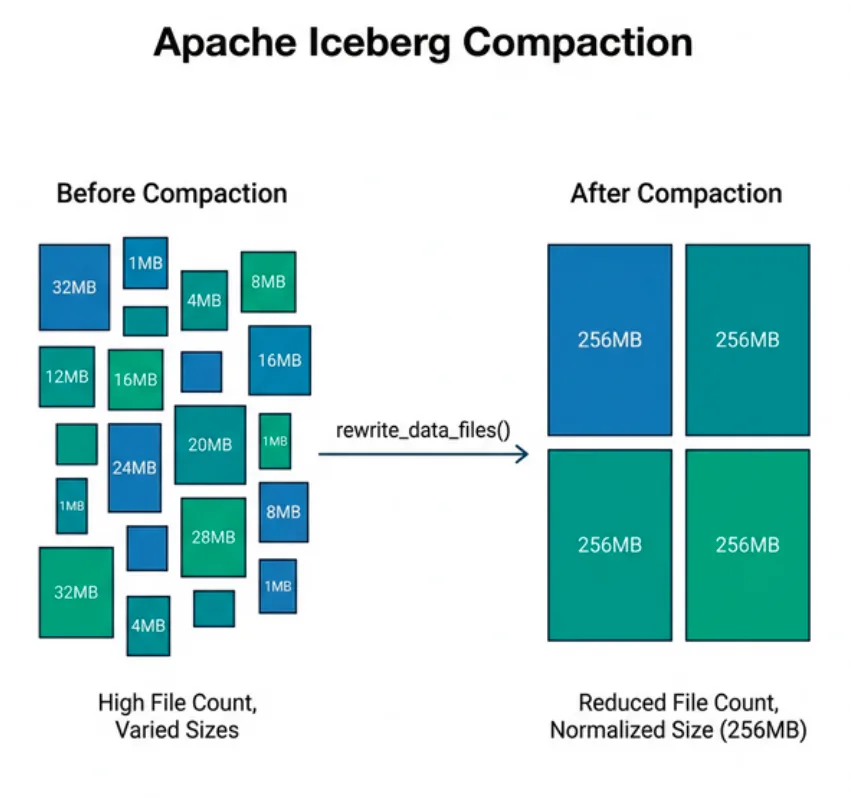
Compaction reads multiple small data files, combines their rows, optionally sorts them by specified columns, and writes new larger data files at the target size. It then creates a new snapshot with updated manifest entries pointing to the new files:
Before compaction: 500 files × 1-10MB each = ~2.5GB total
After compaction:  10 files × 256MB each  = ~2.5GB total (same data, same rows)
Key properties of compaction:
Data is preserved exactly: No rows are added, removed, or modified. Row-level correctness is guaranteed.
History is preserved: The pre-compaction snapshot still exists for time travel until expired.
Sort order is applied: Compaction can sort data by specified columns, tightening column statistics and improving pruning for future queries.
Delete files are resolved: In Merge-on-Read tables, pending delete files are merged into data files during compaction, eliminating the read-time merge cost.
Metadata is updated: New manifests reference the output files with accurate, tight column statistics.
Running Compaction
With Apache Spark
The Iceberg library provides the rewrite_data_files stored procedure:
-- Basic compaction with default settings
CALL catalog.system.rewrite_data_files('db.orders');

-- With explicit target file size (256MB)
CALL catalog.system.rewrite_data_files(
  table => 'db.orders',
  options => map('target-file-size-bytes', '268435456')
);

-- With sort order for improved pruning
CALL catalog.system.rewrite_data_files(
  table => 'db.orders',
  strategy => 'sort',
  sort_order => 'order_date ASC, region ASC'
);

-- With Z-ordering for multi-column filter optimization
CALL catalog.system.rewrite_data_files(
  table => 'db.orders',
  strategy => 'sort',
  sort_order => 'zorder(region, product_category)'
);
Dremio provides the OPTIMIZE TABLE command for on-demand compaction:
OPTIMIZE TABLE db.orders;
Dremio's optimizer automatically applies sort orders and targets optimal file sizes. For tables managed by Dremio's catalog, automatic compaction runs in the background, no scheduling required.
Filtering Which Files to Compact
You don't always need to compact the entire table. Target specific partitions or file sizes to minimize resource consumption:
-- Only compact files smaller than 100MB
CALL catalog.system.rewrite_data_files(
  table => 'db.orders',
  options => map(
    'min-file-size-bytes', '1',
    'max-file-size-bytes', '104857600'
  )
);

-- Only compact specific partitions (recent data)
CALL catalog.system.rewrite_data_files(
  table => 'db.orders',
  where => 'order_date >= DATE ''2024-01-01'''
);
Compaction Strategies
Binpack Strategy (Default)
The default strategy groups small files by partition and rewrites them together to reach the target file size. It does not change data ordering, it simply concatenates files and splits at the target boundary.
Advantages: Fastest compaction strategy. Minimal resource usage. Disadvantages: Does not improve column statistics. If data was unsorted before, it remains unsorted after. Best for: Quick file size normalization when data is already sorted by the writer, or when sort order doesn't significantly impact your query patterns.
Sort Strategy
Reads all targeted files, sorts the combined data by specified columns, then writes new files. More expensive than binpack (requires a full sort) but produces dramatically better column statistics.
Advantages: Tightens min/max bounds per file, enabling far more effective pruning. Disadvantages: Requires enough memory/disk to sort the data. More compute-intensive. Best for: Tables where queries frequently filter on specific columns. This is the most impactful compaction strategy for query performance.
Z-Order Strategy
A variant of sort that interleaves multiple sort dimensions using a Z-curve. Data is clustered across all specified columns simultaneously, rather than sorted primarily by the first column.
Advantages: Effective pruning for any combination of the Z-ordered columns. Disadvantages: Slightly less effective than linear sort for single-column filters. Best for: Tables with multi-column filter patterns. See the Z-ordering guide for details.
Key Compaction Parameters
Parameter
Default
Description
Recommendation
target-file-size-bytes
536870912 (512MB)
Target size for each output file
256-512MB for most workloads
min-file-size-bytes
75% of target
Files below this size are candidates for compaction
Leave as default
max-file-size-bytes
180% of target
Files above this size are not rewritten
Leave as default
min-input-files
5
Minimum number of files in a group to trigger compaction
Lower to 2 for aggressive compaction
max-concurrent-file-group-rewrites
5
Parallelism of rewrite operations
Increase for large clusters
partial-progress.enabled
false
Commit progress between file groups
Enable for very large tables
partial-progress.max-commits
10
Maximum intermediate commits
Increase for tables with millions of files
delete-file-threshold
2147483647
Number of associated delete files to trigger rewrite
Lower to 10-100 for MOR tables
Compaction and Delete Files
In Merge-on-Read tables, row-level deletes and updates create small delete files alongside data files. Over time, this degrades read performance because the engine must merge delete files with data files during every query.
Compaction resolves this: when it rewrites data files, it applies all pending delete files. The output contains only surviving (non-deleted) rows, no delete files remain after compaction.
This is especially critical for two scenarios:
GDPR compliance: After MOR deletion + compaction + snapshot expiry, deleted data is permanently and irreversibly removed from storage.
V3 deletion vectors: While deletion vectors are more efficient than V2 delete files at read time, they still accumulate. Compaction merges them into clean data files.
Related Table Maintenance Operations
Compaction is one of three essential maintenance operations for healthy Iceberg tables:
Manifest Rewriting
Manifests accumulate over time just like data files. Too many small manifests slow down query planning because each manifest must be downloaded and evaluated. Rewrite them periodically:
Every commit creates a new snapshot. Hundreds of snapshots accumulate over weeks. Expiring old snapshots reclaims metadata space and allows garbage collection of orphaned data files:
from pyspark.sql import SparkSession

spark = SparkSession.builder \
    .config("spark.sql.catalog.iceberg", "org.apache.iceberg.spark.SparkCatalog") \
    .getOrCreate()

tables = ["db.orders", "db.customers", "db.events"]

for table in tables:
    # Compact small files with sort order
    spark.sql(f"""
        CALL iceberg.system.rewrite_data_files(
            table => '{table}',
            strategy => 'sort',
            options => map('target-file-size-bytes', '268435456')
        )
    """)

    # Compact manifests
    spark.sql(f"CALL iceberg.system.rewrite_manifests('{table}')")

    # Expire old snapshots (keep last 7 days)
    spark.sql(f"""
        CALL iceberg.system.expire_snapshots(
            table => '{table}',
            older_than => CURRENT_TIMESTAMP - INTERVAL 7 DAYS,
            retain_last => 5
        )
    """)

    print(f"Maintenance complete for {table}")
Schedule this with Apache Airflow, AWS Step Functions, or a simple cron job. Run compaction during low-traffic periods to minimize contention with production queries.
Automatic Compaction with Dremio
Dremio's managed catalog performs automatic compaction, files are monitored and rewritten when they fall below size thresholds. This eliminates the need for external scheduling and ensures tables remain performant without manual maintenance.
When Not to Compact
There are situations where compaction is counterproductive:
During heavy write periods: Compaction competes with writers for S3 bandwidth and catalog commit slots. Schedule compaction during maintenance windows.
Right before a large MERGE INTO: The merge operation will rewrite files anyway, so compacting just before wastes compute.
On very recent streaming data: Let streaming data accumulate for a few hours before compacting. Compacting every 5 minutes wastes resources re-compacting the same data.
When storage costs dominate and queries are rare: Compaction temporarily doubles storage usage (old + new files exist until snapshots expire). If the table is queried infrequently, the read performance benefit may not justify the storage cost.
Measuring Compaction Impact
Track these metrics before and after compaction:
Metric
How to Measure
Expected Improvement
File count
SELECT COUNT(*) FROM table.files
10-100x reduction
Average file size
SELECT AVG(file_size_in_bytes) FROM table.files
256-512MB target
Query planning time
Query profiler / EXPLAIN output
2-5x faster
Query execution time
End-to-end query latency
2-10x faster
Manifest count
SELECT COUNT(*) FROM table.manifests
Should be < 100
Compaction Best Practices Summary
For most production Iceberg tables, follow this compaction playbook:
Streaming tables: Run sorted binpack compaction every 4-6 hours during low-traffic windows. Target 256MB files. Monitor file counts and query planning times to adjust frequency.
Batch tables: Run sorted compaction after each major ETL load. This ensures data is optimally organized before analysts and dashboards query it.
CDC tables (Merge-on-Read): Compact at least daily to resolve accumulated delete files. Set delete-file-threshold to 50 to trigger earlier compaction when delete files pile up.
Multi-engine tables: Compact from a single engine (typically Spark or Dremio) to avoid conflicting compaction runs. Coordinate through the catalog.
Always pair with maintenance: Run rewrite_manifests, expire_snapshots, and remove_orphan_files alongside compaction for complete table health.
For more on how compaction improves query performance and how it fits into the write lifecycle, see the related deep-dive guides.
Frequently Asked Questions
How often should I run compaction on my Iceberg tables?
The optimal compaction frequency depends on your write pattern and query workload. Tables receiving continuous streaming ingestion benefit from compaction every 1-4 hours. Tables with daily batch loads should be compacted shortly after each load completes. Monitor the small file count through Iceberg's metadata tables and trigger compaction when the count exceeds a threshold that noticeably affects query performance.
Does compaction require downtime?
No. Iceberg compaction runs concurrently with reads and writes. Readers continue querying the existing snapshots while compaction rewrites data files in the background. Once the compaction commit succeeds, new queries automatically use the optimized files. The only constraint is that concurrent writers may conflict with compaction if they modify the same data files.
What is the ideal target file size for compaction?
The recommended target is 256-512 MB for Parquet files. Files smaller than 128 MB create excessive metadata overhead and planning latency. Files larger than 1 GB reduce pruning effectiveness because each file spans a wider value range. Tune the target based on your column count and compression ratio.
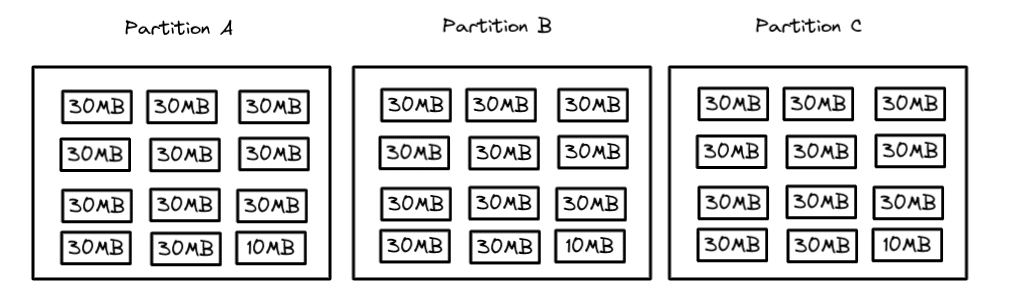
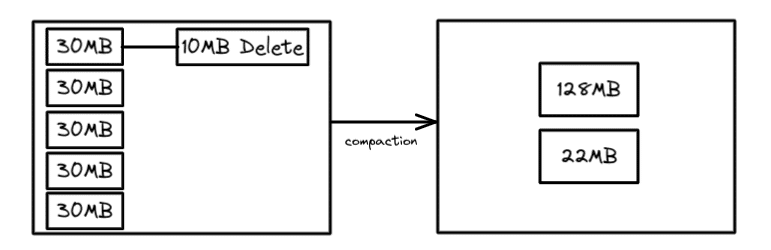
When ingesting data frequently, especially when streaming, there may not be enough new data to create optimal data file sizes for reading such as 128MB, 256MB, or 512MB. This results in a growing number of smaller files which can impact performance as the number of file operations grows (opening the file, reading the file, closing the file).
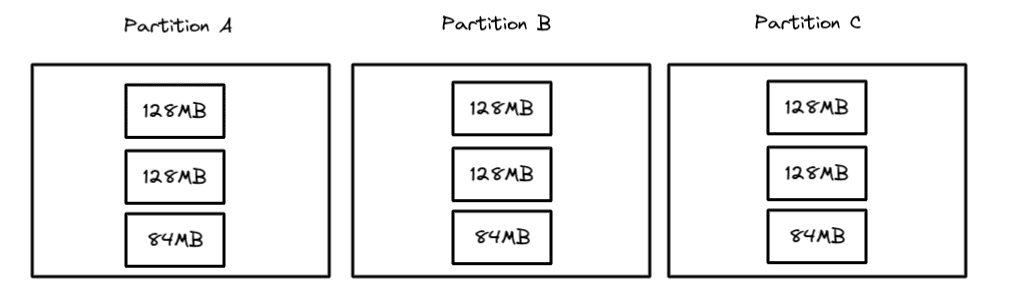
With compaction, you can rewrite the data files in each partition into fewer larger files based on a target file size. So if you target a 128MB file, then the partitions would look like this after compaction:
Now, when you scan a particular partition, there will be only one file to scan instead of five which reduces the number of file operations by 80% and speeds up query performance.
The rewriteDataFiles Procedure
In Iceberg libraries there is a procedure called rewriteDataFiles that is used to perform compaction operations. The procedure can be used in Spark using SparkSQL like this:
-- This will run compaction
-- Target file size set by write.target-file-size-bytes
-- table property which defaults to 512MB

CALL catalog.system.rewrite_data_files(
  table => 'db.table1',
  strategy => 'binpack',
  options => map('min-input-files','2')
)
In both of these snippets, a few arguments are specified to tailor the behavior of the compaction job:
The table: Which table to run the operation on
The strategy: Whether to use the “binpack” or “sort” strategy (each are elaborated upon in the sections below)
Options: Settings to tailor how the job is run, for example, the minimum number of files to compact, and the minimum/maximum file size of the files to be compacted
Other arguments beyond the example above include:
Where: Criteria to filter files to compact based on the data in them (in case you only want to target a particular partition for compaction)
Sort order: How to sort the data when using the “sort” strategy
Note: Regardless of your strategy, if the table has a "sort order," it will be used for a local sort. After all the records have been distributed between different tasks, the data will use that sort order within each task. Using the "Sort" strategy will do a global sort before allocating the data into different tasks, resulting in a tighter clustering of data with similar values.
The default rewrite strategy is binpack which simply rewrites smaller files to a target size and reconciles any delete files with no additional optimizations like sorting. This strategy is the fastest, so if the time it takes to complete the compaction is a consideration, then this may be your best option. The target file size is set as a table setting which defaults to 512MB, but it can be changed like so:
--Setting Target File Size to 128mb
ALTER TABLE catalog.db.table1 SET TBLPROPERTIES (
    'write.target-file-size-bytes' = '134217728'
);
While running a binpack may be the fastest strategy if you are running compaction during streaming or frequent batches, you may not want to run compaction on the entire table. Only the data ingested during the last period will be compacted to avoid small files.
For example, the following snippet only compacts files that include data created in the last hour, assuming our schema included an “ingested_at” field that is filled when the data is being ingested:
CALL catalog_name.system.rewrite_data_files(
  table => 'db.sample',
  where => 'ingested_at between
  	"2022-06-30 10:00:00"
  	and "2022-06-30 11:00:00" '
)
This results in a much faster compaction job that won’t compact all files or reconcile every delete file but still provides some enhancement until a larger job can be run on a less regular basis.
The Sort Strategy
The sort strategy allows you not only to optimize the file size but also sort the data to cluster the data for better performance. The benefit of clustering similar data together is that fewer files may have relevant data to a query, meaning the benefits of min/max filtering will be even greater (fewer files to scan, the faster).
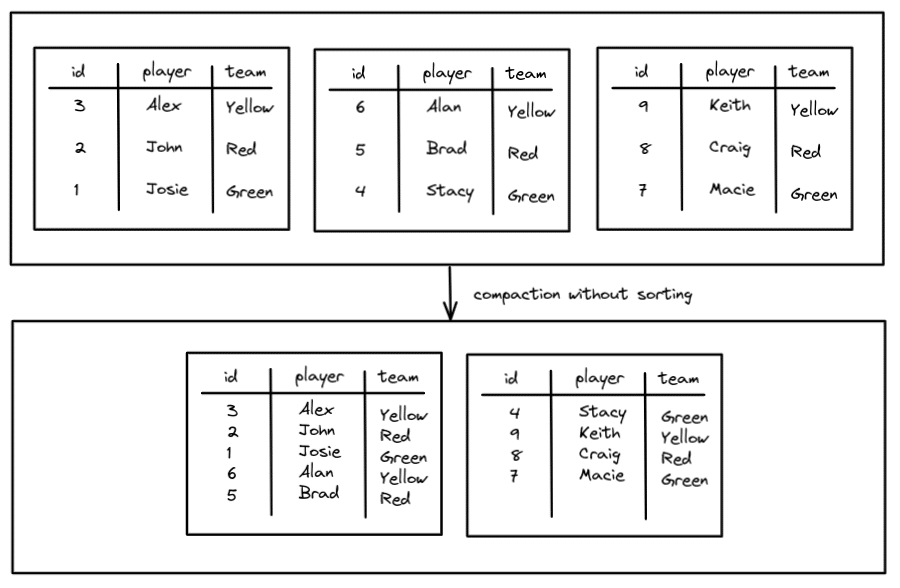
For example, without sorting:
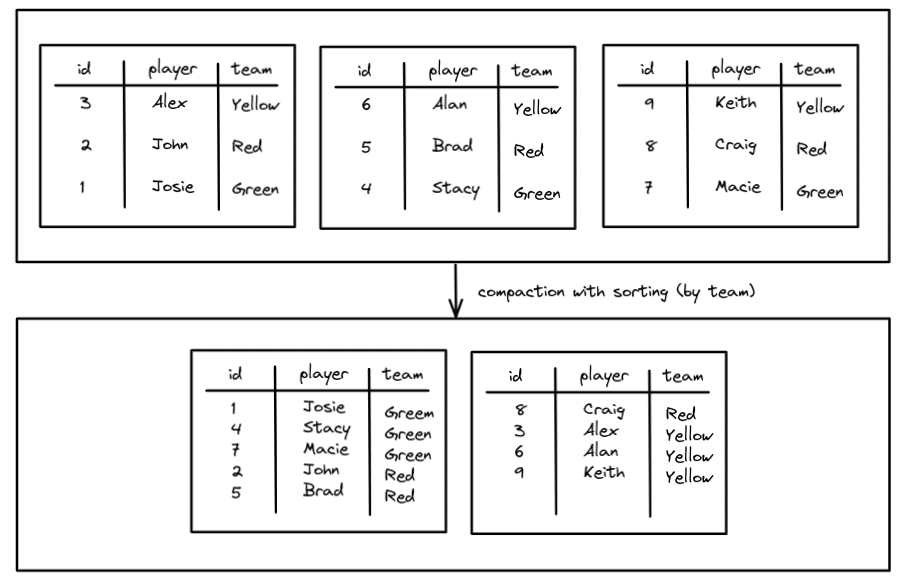
We reduced the number of files from three to two, but without sorting, regardless of which team you may query for, you have to search both files. This can be improved with sorting so you can cluster the data by team.
Now all the Green and Yellow team data is limited to one file which will speed up queries for members of those teams. The Red team is split across two files but we are still better off than before. To run compaction using the sort strategy looks pretty much the same as binpack except you add a “sort_order” argument.
When specifying your sort order you can specify multiple columns to sort by and must specify how nulls should be treated. So if you want to sort each team by their name after the initial team sort, it would look like this:
CALL catalog.system.rewrite_data_files(
  table => 'db.teams',
  strategy => 'sort',
  sort_order => 'team ASC NULLS LAST, name DESC NULLS FIRST'
)
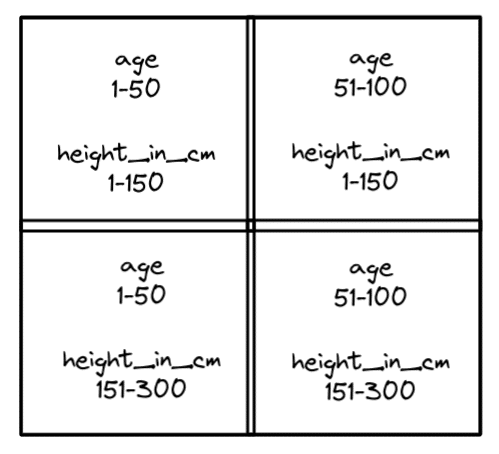
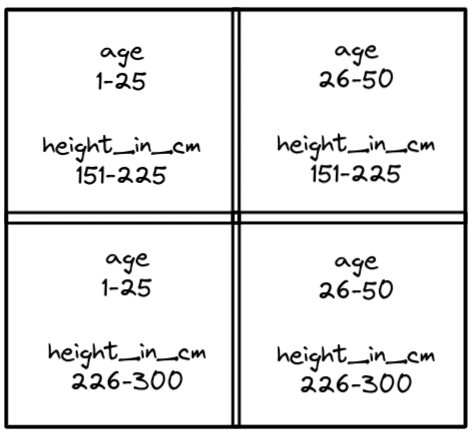
To illustrate how this works, imagine that you wanted to sort a table by height_in_cm and age and you plotted all the records into four quadrants like the following:
So you put all records into these four quadrants and then write them to appropriate files. This will maximize the benefit of min/max filter when both dimensions are typically involved in the query. So if you searched for someone of age 25 who is 200cm in height, the records you need would be located in only the files that records in the bottom-left quadrant were written to.
Z-order sorting can repeat multiple times, creating another four quadrants within a quadrant for even further fine-tuned clusters. For example, if the bottom-left quadrant were further Z-ordered, it would look like this:
The result is a very effective file pruning anytime you filter by age and height_in_cm. To configure the compaction job to take advantage of Z-order clustering you would just run a compaction job like so:
Running compaction jobs on your Apache Iceberg tables can help you improve their performance but you have to balance out the level of optimization with your needs. If you run frequent compaction that need to be completed quickly, you are better off avoiding sorting and using the binpack strategy.
Although, if you want better optimization of reads, using sort can maximize the compaction benefit (use Z-order when multiple dimensions are often queried). Apache Iceberg gives you powerful compaction options to make sure your table performance is blazing fast on your data lakehouse.
Try Dremio Cloud free for 30 days
Deploy agentic analytics directly on Apache Iceberg data with no pipelines and no added overhead.
Ingesting Data Into Apache Iceberg Tables with Dremio: A Unified Path to Iceberg
By unifying data from diverse sources, simplifying data operations, and providing powerful tools for data management, Dremio stands out as a comprehensive solution for modern data needs. Whether you are a data engineer, business analyst, or data scientist, harnessing the combined power of Dremio and Apache Iceberg will undoubtedly be a valuable asset in your data management toolkit.
Sep 22, 2023·Dremio Blog: Open Data Insights
Intro to Dremio, Nessie, and Apache Iceberg on Your Laptop
We're always looking for ways to better handle and save money on our data. That's why the "data lakehouse" is becoming so popular. It offers a mix of the flexibility of data lakes and the ease of use and performance of data warehouses. The goal? Make data handling easier and cheaper. So, how do we […]
Oct 12, 2023·Product Insights from the Dremio Blog
Table-Driven Access Policies Using Subqueries
This blog helps you learn about table-driven access policies in Dremio Cloud and Dremio Software v24.1+.